




How to install Trisquel with Full Disk Encryption including the Boot Partition
- Vous devez vous identifier ou créer un compte pour écrire des commentaires

You want your computer to be secure. You read about Full Disk Encryption and then, of course, you want your GNU/Linux Trisquel operating system installed that way.
What does the Full in Full Disk Encryption mean?
But then, just in your very first step, you stumble: There is not an unique Full Disk Encryption. Wait, what? Full means one hundred percent, right? Are there different kinds of one hundred percent out there? Well… yes.
To understand why there are different meanings for Full Disk Encryption, you need to know that drives storing operating systems are divided into three parts:
• Partition Table: A boot sector containing the table of partitions for the disk.
• Boot Partition: A partition containing the kernel image.
• Rest of the disk: One or more partitions containing the rest of the operating system, the user data, and the swap area if requested.
Now, you can understand the GNU/Linux start-up process that happens when the computer is switched on:
• First, the firmware stored in the Motherboard Flash Chip (BIOS or UEFI) gets executed. This firmware includes a boot loader. This boot loader identifies the drives, reads their Partition Tables (MBR or GPT), and loads the kernel image from the Boot Partition.
• Second, the kernel gets executed. The kernel performs the graphic initialization, mounts the rest of partitions onto the filesystem, and loads the rest of the operating system.
Now you can understand the historical evolution of the term Full Disk Encryption:
• At first, not boot loaders nor kernels can manage encrypted partitions. There is no Full Disk Encryption.
• Then, the kernel gains the ability to manage encrypted partitions. Remember, the kernel is executed only after the Partition Table is read and the kernel is loaded from the Boot Partition. Full Disk Encryption means to encrypt everything in the disk except for the Partition Table and the Boot Partition.
• Then, the boot loader present in some BIOS and UEFIs gain the ability to manage encrypted partitions as well. Remember, the partitions can only be accessed after the Partition Table is read. Full Disk Encryption means to encrypt everything in the disk except for the Partition Table.
• Then, some boot loaders gain the ability to manage encrypted Partition Tables as well. Full Disk Encryption means to encrypt everything in the disk without exception. Finally, Real Full Disk Encryption for once and for all.
So, ‘Full’ in this context is taken to mean ‘As full as possible at the moment’, and with the passage of time, that leads to three different meanings. As for GNU/Linux Trisquel, I know only of the first and second form of Full Disk Encryption being available, the Partition Table never being encrypted. So, we have two choices for Full Disk Encryption: with or without encrypting the Boot Partition. One is fuller than the other, but neither is fullest.
Searching for a reliable Secure Boot
In case you want to use GNU/Linux Trisquel with Full Disk Encryption including the Boot Partition, you need a computer with firmware capable to manage encrypted partitions. And if you want reliable firmware, you do not want the UEFI Secure Boot specification nor its proprietary, closed-source implementations. Instead, you search for a Libre alternative.
And such alternative exists since 2013: Secure libreBoot, a Libre Secure Boot alternative. It is implemented in Libreboot and Canoeboot, firmware replacements created by Leah Rowe for BIOS and UEFI.
Canoeboot and Libreboot
Canoeboot and Libreboot releases include the replacement ROMs together with the tools needed to prepare them and write them to the Motherboard Flash Chip:
1. A generic tool to write the Flash memory: flashrom or flashprog.
2. A generic tool to access the Core Boot File System (CBFS): cbfstool.
3. A specific tool to modify the MAC address for the Ethernet interface: ich9gen or nvmutil, specific for Lenovo Thinkpad models with chipset GM45 that use the e1000 Ethernet controller, X200, X200S, X200 Tablet, R400, T400, T400S, T500 and W500.
4. A specific tool to set the BackUp Control Top Swap bit, bucts, and variants of the flashrom tool, flashrom_lenovobios_sst and flashrom_lenovobios_macronix, all of them specific for the Lenovo Thinkpad models T60, X60, X60 Tablet and X60S.
5. Other tools.
These are the releases of Canoeboot and Libreboot:
• Canoeboot (www.canoeboot.org). Created in 2023, is just Libreboot without the choice to include blobs, so it is always Libre. These are its releases so far: 20231026, 20231101, 20231103, 20231107, 20240504, 20240510, 20240612, 20241102, 20241207, 20250107, 25.04, 25.06, 26.01rev1.
• Libreboot (www.libreboot.org). Created in 2013, these are its Libre releases: 20131212, 20131213, 20131214, 20140221, 20140622, 20140711, 20140716, 20140720, 20140729, 20140811, 20140903, 20140911, 20141015, 20150124, 20150126, 20150208, 20150518, 20160902, 20160907. However, when after a six-year hiatus Libreboot is continued from 2022 on, it offers choices that include blobs for device initialization and microcode updates, hence it is no longer Libre. These are its non-Libre releases so far: 20220710, 20230625, 20240612, 20241206, 25.06, 26.01rev1.
So, at present the one that is Libre is Canoeboot, not Libreboot. Yes, I agree that that is counterintuitive. Yes, I agree that the universe is imperfect.
Unfortunately, the range of computers compatible are limited, most of them being no longer in production – that means that if you really want to have a computer with an encrypted Boot Partition, you would need to find it second-hand. Check out the supported computer list for Canoeboot here:
Which systems are supported by Canoeboot?
https://canoeboot.org/docs/install/#which-systems-are-supported-by-canoeboot
What is like to have Full Disk Encryption for GNU/Linux Trisquel
Using a computer with Full Disk Encryption is just the same as any other computer. The only difference happens at start-up:
• Before graphical initialization, if you chose to have Full Disk Encryption with an encrypted Boot Partition, the bootloader will ask you for the LVM (Logical Volume Manager) passphrase so it can decrypt the boot partition.
• After graphical initialization, if you chose to have Full Disk Encryption, the kernel will ask you for the LVM passphrase - yes, even if you already introduced it to decrypt the Boot Partition. The bootloader does not pass the passphrase forward to the kernel. I suppose this is a feature caused by security reasons, not a bug.
Installing GNU/Linux Trisquel with Full Disk Encryption, including the Boot Partition
It’s 2016. You get yourself a Libreboot-compatible computer. You liberate it by replacing its firmware with Libreboot. You configure Libreboot in the optimal way for your computer. You install GNU/Linux Trisquel with Full Disk Encryption including the Boot Partition by following Libreboot’s guide for Trisquel. You finish. Libre Hardware. Libre Software. Libre Computer. Full Disk Encryption including the Boot Partition. Life is good.
It’s 2026. You get yourself a Libreboot-compatible computer. You try do to the same, but you keep coming across problems. There are obstacles on the way that weren’t there before. What is happening? Things are more difficult in 2026 than they were in 2016! You get acquainted with the First Rule of Internet: Whatever is online today, does not have to be online tomorrow. Veterans know to not rely on Internet and keep a copy of anything they need.
First problem: Tools included in Canoeboot and Libreboot are not included in binary format after Libreboot release 20160907. Canoeboot, that exists not at the time, never includes these tools in binary format. Dang. Current releases include tools only in source format and the users needs to compile them themselves. To compile is not difficult, just to navigate to the right directory and enter a simple command. However, compiling fails often because of dependencies to absent packages. Gosh. This is specifically problematic for Trisquel because, being a strictly Libre distribution, it has more restricted software sources than others distributions. Blast. To help to deal with this problem, from late 2024 on there is a script called mk included to help you by installing dependencies for many GNU/Linux distributions. You execute it as root by typing:
# ./mk dependencies trisquel
However, in the last releases of Canoeboot and Libreboot, 26.01rev1, the script no longer supports distributions Parabola, Popos… and Trisquel. Ouch. That hurts. In that case, this is what worked for me:
# ./mk dependencies ubuntu
Specifically for Trisquel 12, I recommend:
# ./mk dependencies ubuntu2404
Still, this workaround might not be enough and compiling still could fail!
First solution: I published a step-by-step guide to liberate old Thinkpad computers with Libreboot and Canoeboot where I deal with this problem by, spoiler alert, proposing a simple strategy: if compiling fails, keep trying with older releases until compiling is successful or reaching back Libreboot release 20160907, that includes the tools in binary format.
Nacho Agulló's Node in English: How to liberate an old Thinkpad
https://www.grafotema.com/agullo/articulos/thinkpad/How_to_liberate_an_old_thinkpad.html
Second problem: Specific tools for Lenovo Thinkpad models T60, X60, X60 Tablet and X60S are currently not included in Libreboot and Canoeboot releases, nor even in source format: bucts, flashrom_lenovobios_sst and flashrom_lenovobios_macronix. Again, the last release to include them was Libreboot 20160907. Again, Canoeboot, that did not exist at the time, never included these tools. If you visit the Canoeboot website and read the guide for installing Canoeboot in these computers, you will be told to just download that old release and get the tools from there. But instead of calling it Libreboot 20160907, it mistakenly calls it Canoeboot 20160907 - oh, the wonders of text replacement:
Canoeboot – Install Canoeboot Free BIOS/UEFI boot firmware
https://canoeboot.org/docs/install/#thinkpad-t60x60x60tabletx60s
So this old Libreboot release is not only necessary as a fallback strategy for obtaining the tools, but it is indispensable in particular for Lenovo Thinkpad models T60, X60, X60 Tablet and X60S. However, Libreboot’s official mirror at United Kingdom currently keeps only the four last releases, so at some point they dropped that old release in spite of being indispensable for some computers. And the other Libreboot mirrors, well, mirrored this one, so they lost that release too. Darn.
Second solution: There is an exception, an outdated mirror that does not include the most recent release but still has release Libreboot 20160907 - for now. If you are still not a veteran that knows Internet’s First Rule, become one right now. Download a copy while you still can.
HTTP German mirror in-berlin.de
http://mirror.helium.in-berlin.de/libreboot/stable/ .
Third problem: After installation of Canoeboot or Libreboot is successful, both include a filesystem called CBFS. This filesystem contains the GRUB boot loader that, besides to manage encrypted partitions, allows to edit the configuration script grub.cfg and the alternative script grubtest.cfg, and if memory serves me, also to rewrite them directly from GRUB. However, around 2025 the menu options for accessing grub.cfg and grubtest.cfg become missing. Jeez.
Third solution: No solution, just do without it.
Fourth problem: Canoeboot and Libreboot provide also a specific tool called cbfstool that, you guessed it, is not included in binary format after Libreboot release 20160907 so in case you need it you have to compile it. This cbfstool allows to modify the contents of the CBFS in the ROM written to the Motherboard Flash Chip, editing the grub.cfg and grubtest.cfg scripts.
However, accessing the CBFS for the current versions of Canoeboot and Libreboot finds neither of those files. Crap. This is what I get:
FMAP REGION: COREBOOT

Name                           Offset     Type           Size   Comp

cbfs_master_header             0x0        cbfs header        32 none

cpu_microcode_blob.bin         0x80       microcode      135168 none

config                         0x210c0    raw              3231 LZMA (10352 decompressed)

revision                       0x21dc0    raw               760 none

build_info                     0x22100    raw                90 none

fallback/dsdt.aml              0x22180    raw             15768 none

vbt.bin                        0x25f80    raw              1412 LZMA (3863 decompressed)

cmos.default                   0x26540    cmos_default      256 none

cmos_layout.bin                0x26680    cmos_layout      1840 none

fallback/postcar               0x26e00    stage           25960 none

etc/ps2-keyboard-spinup        0x2d3c0    raw                 8 none

etc/pci-optionrom-exec         0x2d400    raw                 8 none

etc/optionroms-checksum        0x2d440    raw                 8 none

scan.cfg                       0x2d480    raw                26 none

background.png                 0x2d4c0    raw              3451 none

bootorder                      0x2e280    raw                15 none

keymap.gkb                     0x2e2c0    raw               492 none

(empty)                        0x2e500    null             6756 none

fallback/romstage              0x2ff80    stage           65304 none

fallback/ramstage              0x3ff40    stage          115281 LZMA (242792 decompressed)

img/u-boot                     0x5c200    simple elf     389958 none

fallback/payload               0xbb580    simple elf      72272 none

vgaroms/seavgabios.bin         0xcd000    raw             28160 none

img/memtest                    0xd3e40    simple elf     143315 none

img/grub2                      0xf6e40    simple elf     606467 none

(empty)                        0x18af80   null          6676516 none

bootblock                      0x7e8fc0   bootblock       24576 none
Fourth solution: Again, no solution, just do without it. Canoeboot and Libreboot automatically search for any available drives, then if the drives are encrypted they ask you the passphrases to decrypt them. Having a single encrypted drive, I could optimize the start-up by not wasting time searching for others - every start-up is currently taking 20 seconds from the GRUB menu to asking me the drive’s passphrase, and that time could be halved. Well, I guess I will be losing 10 seconds in every start-up.
Fifth problem: All right, Canoeboot or Libreboot is already installed and configured. At least, time for the actual Trisquel install with Full Disk Encryption, including the Boot Partition. You search for Canoeboot or Libreboot guide… and it is gone. In July 23rd, 2021, Leah Rowe decided to delete the guides because of being outdated and the effort to update them deemed ‘unsustainable’.
move distro FDE+/boot/ guides to distro wikis/manuals and don't host them on libreboot.org anymore - NotABug.org: Free code hosting
https://web.archive.org/web/20220704233400/https://notabug.org/libreboot/lbwww/issues/4
Fair enough, Canoeboot and Libreboot cannot maintain guides for installing all of the endless GNU/Linux distributions and the responsibility goes to the distribution themselves. So you open Trisquel’s documentation in search of an installation guide and, certainly, there is a documentation page for Full Disk Encryption Install since 2011. Good. Follow its instructions to the letter. Cheer yourself up as the installation is completed successfully. Are you done already?
However, when you start GNU/Linux Trisquel you are only asked for the passphrase once. Strange. So you open Gparted and check out the partitions in your drive and… the Boot Partition is not encrypted. Oh, for crying out loud! Is Trisquel documentation a fraud? Not really, it is just the good old misnaming. Trisquel’s documentation has Full Disk Encryption WITHOUT the Boot Partition.
Fifth solution: Be a veteran a keep an old copy of Libreboot’s website with the old installation guide. Alternatively, use the Internet Archive, cross your fingers and… yes, you are lucky:
Libreboot – Installing Trisquel GNU+Linux with Full-Disk Encryption (including /boot)
https://web.archive.org/web/20210511123917/libreboot.org/docs/gnulinux/encrypted_trisquel.html
Learn how to install Trisquel with Full Disk Encryption including the Boot Partition, then update Trisquel’s Full Disk Encryption documentation so it includes choices for both with and without Boot Partition. Done, there you have it:
Full Disk Encryption Install | Trisquel GNU/Linux - Run free!
https://trisquel.info/en/wiki/full-disk-encryption-install
Perform the installation, following the choice for encrypted Boot Partition. Check that this time Trisquel’s startup properly prompts you for passphrase twice, and Gparted confirms that all partitions are encrypted. At last you are done! Sing Chumbawamba’s Tubthumping. ‘I get knocked down, but I get up again, you’re never gonna keep me down’.
The End
It’s 2026. You get yourself a Libreboot-compatible computer. You liberate it by replacing its firmware with Canoeboot. You leave Canoeboot with the default configuration. You install GNU/Linux Trisquel with Full Disk Encryption including the Boot Partition by following Trisquel’s Full Disk Encryption Install guide. You finish. Libre Hardware. Libre Software. Libre Computer. Full Disk Encryption including the Boot Partition. Life is good. But heck, what a lot of extra effort does it take to make it in 2026.
There are a couple of errors that I noticed too late:
* The missing releases from Canoeboot and Libreboot are still available, just inside the directory /old/stable
* The 'mk dependencies trisquel' script that no longer works for Libreboot still works for Canoeboot, and has another, specific 'mk dependencies trisquel12' value.

Hey, just want to thank you for sharing the info, it will certainly be helpful to many.
I remember when I first got my T400, getting Trisquel... 8? 9? Anyways, with FDE was easy and everything worked just as you said. Plenty of documentation and programs ready to use. Nowadays... If I want to keep FDE, I basically have to install T9 (yeah, that was the one, now I remember) upgrade to 10, then to 11... I just don't want to make a fresh install anymore due to that :(
I guess at some points you kinda focused too much on the rant (albeit comical) side of it, but overall you did share a lot of useful tips and I thank you for it.

 I am a translator!
If you use the default installer of Guix system and select encryption, the boot partition is also encrypted, regardless whether the computer boot firmware is BIOS (libre or not) or UEFI. The Guix system installer puts GRUB on the disk, and GRUB can decrypt the boot partition. I guess the same should be feasible with Trisquel but I have never tried.

"If you use the default installer of Guix system and select encryption, the boot partition is also encrypted ... The Guix system installer puts GRUB on the disk..."
Encrypting /boot just shifts GRUB to a different unencrypted location on the drive, which doesn't actually solve the problem or reduce the attack surface. Even moving GRUB to the motherboard's flash chip just changes the attack vector from a software exploit to a hardware tampering one. Ultimately, the bootloader must remain unencrypted somewhere.
I am a translator!
Encrypting /boot just shifts GRUB to a different unencrypted location on the drive
This is exactly what I wrote.
which doesn't actually solve the problem or reduce the attack surface
I am not sure which problem you are referring to, the original message did not describe any, it only said how to encrypt the boot partition, so I mentioned that Guix system does it. If the problem is that the boot partition contains confidential data that you don't want someone to access if the computer is stolen, that seems to solve the problem.

The problem is stated there:
"...the bootloader must remain unencrypted somewhere"
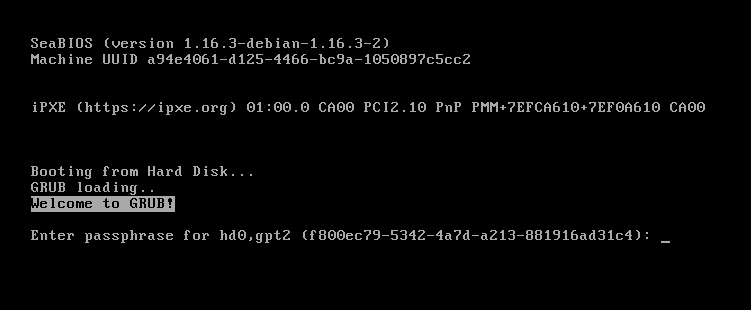
Encryption is useless without at least one access to a decryption mechanism, which in this case is the boot loader. I have not used encryption for the /boot partition, but I suppose that you get a prompt for a passphrase at some point during boot?
I am a translator!
I suppose that you get a prompt for a passphrase at some point during boot?
Yes, here is a screen capture from guix system boot in a virtual machine.
The issue with /boot isn't about confidential data but that it leaves the system open to the "Evil Maid" attack, in which an attacker replaces an unencrypted part of the boot process.
While it's true Guix can encrypt /boot, bringing it up might lead people to think it offers better security against this specific threat. Since the initial stage of GRUB still has to live somewhere, and in an unencrypted form for decryption, the attack surface hasn't really been reduced. Encrypting /boot is just relocating the vulnerable entry point, not eliminating it.
To actually solve this one needs a method to verify the unencrypted boot components haven't been tampered with, not just more encryption.
I am a translator!
it leaves the system open to the "Evil Maid" attack
True.
To actually solve this one needs a method to verify the unencrypted boot components haven't been tampered with
I suppose that replacing an unencrypted part of the boot process is only one way, the attacker could have modified the firmware of a component in another flash memory, or replace a component with another with rogue firmware, added something for keylogging, or whatever. The most efficient and reliable solution might be to keep the computer with you at all times, or in a physically secure location.

Hi Jason,
You’re right about shifting the point of attack; one way to do this is to install GRUB on a USB drive. A few years ago, I experimented with this setup, and it works.
https://forums.hyperbola.info/viewtopic.php?id=937
When it comes to attack vectors, a simple laptop theft will work whether or not the /boot partition is encrypted.
If we’re talking about more serious attack vectors—for example, the persecution of a lawyer or political activist—then, as the internet says, such a user will simply be detained along with the laptop and physically forced (through blackmail, torture, etc.) in one way or another to enter the password.
We need another way to protect ourselves so as not to compromise our security—for example, cloud storage instead of an encrypted GRUB and SSD.
An example of such a laptop => https://shop.ssg.systems/eng/catalogue
Such computers have been around for a long time; they don’t have SSDs. Naturally, the user shouldn’t go around telling everyone what kind of computer they have, the model, the operating system, etc
Hi Ignacio.Agullo,
Thanks for your long and detailed post and the links to your page.
Here are my thoughts after reading it.
I completely agree with you that installing Libreboot right now is a pain in the ass))—sorry, but that’s the mildest way to put it.
My conclusion is this:
"Like developer, like code..."
A proper, professional developer will make the installation of any software as convenient and straightforward as possible for the user—in just one or two steps—where the user downloads a script and the program installs itself automatically. There are plenty of examples like this.
A bad one will tell you to check the wiki and make you go through a 10-step installation process with constant messages in the support chat))

I have a question for you: why install Libreboot or Canoeboot on the X200 you’re holding in the photo when there’s GnuBoot and GRUB (2.14) that supports argon2id?
If, for example, we were talking about the T440P, then I understand the logic of installing Coreboot or Libreboot
That means you can also set up full disk encryption, including the boot partition.
P.S. I believe that soon the Chinese will save the world again by creating open-source hardware—something like a very powerful Rockchip processor—and instead of the T400, we’ll have a significantly more powerful laptop with GnuBoot, which is currently the most open-source option available.
Thanks to NeoX, Jason, GnuToo, and others for this.
"I have a question for you: why install Libreboot or Canoeboot on the X200 you’re holding in the photo when there’s GnuBoot and GRUB (2.14) that supports argon2id?"
Well, that photo is from 2016, years before GnuBoot.
As for GnuBoot, it is my understanding that its launch was a reaction to Libreboot becoming non-Libre in November, 2022, so a Libre alternative to Secure Boot would be guaranteed to exist. With the launch of Canoeboot, the strictly Libre version of Libreboot, in October, 2023, the old alternative to Secure Boot is back after an eleven-month hiatus.
So since 2023 we have two choices, which is fine. But if you check out GnuBoot's hardware compatibility list, it is so much limited, almost everything is "Not tested":
https://www.gnu.org/software/gnuboot/status.html
By the way, Gnu.org just went down right after I accessed that page.
Is Gnu.org down? Live status and problems past 24 hours
https://downforeveryoneorjustme.com/gnu.org?proto=https&www=1
It's not just you! gnu.org is down.
Last updated: Jun 25, 2026, 12:48 PM (5 seconds ago)
So, anyway, Canoeboot/Libreboot is still my primary Secure Boot alternative. Its documentation is complete, but presented in a disperse way. So I did the only thing a simple user can do: Write an alternative installation guide for old Thinkpads that simplifies the installation process to 12 straightforward steps.
I am trying to publish a comment to reply to Avron's comment, but I keep getting 403 Forbidden, both as a reply to Avron's comment and as a new comment. My text is plain text, so I cannot see where the problem is coming from.
However, this comment is allowed, and I can edit it to expand it. All right... I am editing it and adding more text every time. Let's see where the problem is encountered.
This is Avron's line:
"The Guix system installer puts GRUB on the disk, and GRUB can decrypt the boot partition. I guess the same should be feasible with Trisquel but I have never tried."
My reply:
GRUB on the disk is not the most secure option, it is the less secure.
Having to deal with security as part of your job means you get payed to get paranoid.
Anyway, just for the fun of it...:
Level 0 (No Encryption): The bootloader is on the disk, for instance in the Master Boot Record. Your data is exposed to 1-time physical attacks. Anybody getting their hands on your computer can extract the disks, m_a_k_e a c_o_p_y, put everything back in place and have all of your data without you noticing. So, were those the words causing the problem?
Rest of my comment... Oh, I get the Forbidden response again. Again, let's edit the comment adding one phrase at a time:
Level 1 (User Folder Encryption): The bootloader is on the disk, for instance in the Master Boot Record. Your data is no longer exposed to 1-time physical attacks. Anybody getting a copy of your user data just gets encrypted data. But they can perform 2-time physical attacks (which I guess is what jxself c_a_l_l_s
The word c_a_l_l_s also causes my comment to receive a Forbidden response.
This is ridiculous.
Posting under these circumstances is not worth the effort.
Level_1_(User_Folder_Encryption):__The_bootloader_is_on_the_disk,_for_instance_in_the_Master_Boot_Record.__Your_data_is_no_longer_exposed_to_1-time_physical_attacks.__Anybody_getting_a_copy_of_your_user_data_just_gets_encrypted_data.__But_they_can_perform_2-time_physical_attacks_(which_I_guess_is_what_jxself_calls_"Evil_Maid_Attack").__In_the_first_time_they_manipulate_the_operating_system_to,_say,_introduce_a_keylogger.__Later,_after_you_unsuspectingly_use_your_computer,_they_perform_the_second_attack:_the_keylogger_has_stored_your_password_in_an_unencrypted_part_of_the_disk,_so_they_can_find_it_and_use_it_to_get_your_data.
Level_2_(Full_Disk_Encryption_excluding_Boot_Partition):__The_bootloader_is_on_the_disk,_for_instance_in_the_Master_Boot_Record.__Your_data_is_still_exposed_to_2-time_physical_attacks_similar_to_the_previous_one.__Most_of_the_operating_system_is_stored_in_encrypted_partitions,_so_in_the_first_attack_they_will_not_be_able_to_manipulate_it,_but_the_kernel_is_still_in_the_unencrypted_Boot_Partition,_so_they_can_still_manipulate_the_kernel_and_then_proceed_similarly.
Level_3_(Full_Disk_Encryption_including_Boot_Partition):__The_bootloader_is_on_the_firmware.__Your_data_is_still_exposed_to_2-time_physical_attacks.__The_Boot_Partition_is_encrypted,_so_they_cannot_manipulate_the_kernel.__But_they_still_can_manipulate_the_firmware.__Once_the_bootloader_in_the_firmware_gets_the_passphrase_to_decrypt_the_disk,_it_can_rewrite_the_firmware_and_hide_a_copy_of_the_passphrase.__In_the_second_attack_the_firmware_appears_to_be_unchanged,_but_if_the_attacker_types_a_special_combination_of_keys_it_will_be_revealed.
Level_4_(Full_Disk_Encryption_including_Boot_Partition_and_Write_Protection):__The_bootloader_is_on_the_firmware.__The_Flash_Memory_can_be_protected_against_internal_rewrite_in_an_irreversible_manner.__But_your_data_is_still_exposed_to_2-time_physical_attacks.__In_the_first_attack_they_dismantle_your_computer,_set_wires_from_a_Flasher_Computer_to_your_BIOS/UEFI_and_rewrite_its_contents_through_SPI_protocol,_then_put_everything_back_in_place.
So,_you_see,_no_Security_ever_provides_a_definitive_defense,_it_just_makes_attacks_more_difficult._
Hi Ignacio.Agullo,
Thanks for your reply.
Yeah, I also got a “403 Forbidden” error and couldn't post the message; it was related to the links. As soon as I deleted them, I was able to post the text.
It might be due to attacks on the site or some kind of restrictions.
I strongly recommend GnuBoot—it’s the most open-source option available today, and the XMPP community is very friendly and not as strict as the one in Libreboot.
I also recommend you check out this video
https://inv.zoomerville.com/watch?v=dHJ9m6HRwq0
and
https://events.ccc.de/congress/2024/hub/en/event/a-fully-free-bios-with-gnu-boot/